Introducing the Queues app: Enabling customer engagement in Microsoft Teams | Microsoft Community Hub
Disconnected tools can slow service and frustrate customers. The new Queues app in Microsoft Teams addresses this by routing and organizing incoming chats, helping teams respond faster and more effectively. Read the blog to see how the app enables better customer experiences and improves internal workflows. For tailored implementation guidance, contact RCITMS today.
The Queues app is a Teams-native solution designed to help organizations manage customer engagements efficiently, starting with calls. It allows team members to make and receive customer calls directly within Teams, providing tailored experiences for users and leads. The app offers real-time statistics on call queue performance and enables members to opt-in or out of call queues based on their availability and business needs.
How does the Queues app enhance customer engagement?
The Queues app enhances customer engagement by facilitating collaborative call handling among team members. It allows users to quickly access relevant customer profile information from their CRM tools during calls, improving context and efficiency. Additionally, it provides essential call controls, such as call transfer, to expedite the process of reaching out for expert advice or handling escalations.
Who can manage call queues with the Queues app?
With the Queues app, authorized users, specifically leads, can manage their team, call queues, and auto attendants based on business needs. They have access to a comprehensive analytics dashboard for real-time and historical reporting, enabling faster decision-making and improvements in customer operations. This democratizes the management of call queues, which was previously limited to Teams administrators.
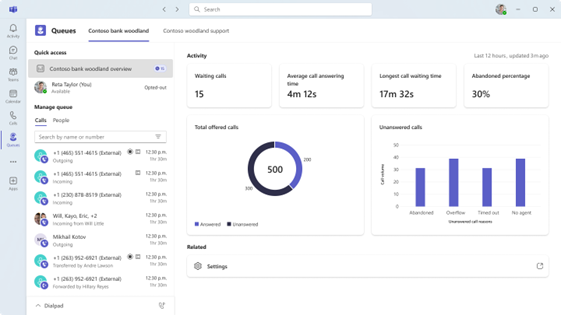
Introducing the Queues app: Enabling customer engagement in Microsoft Teams | Microsoft Community Hub
published by RCITMS
RCITMS is Minority and Veteran Owned Cloud and Managed Services provider. Managed Service providers have become a commodity recently, but RCITMS takes pride in providing a total customer solution separating ourselves from other competitors.
IT Managed Services
We perform up/down device monitoring, asset management for in-scope monitored devices, and escalation for your IT. You perform all day-to-day management of services.
We co-manage with you, acting as an extension to your IT team to assist with issues. Our Network Operations Center (NOC) does infrastructure monitoring, alerting, first attempt at resolution through our standard deployed tools’ functionality, and escalation to your IT or Tier-1 escalations to your Internet Service Provider(s).
Thoroughly Understand Your Business Strategically Plan Your IT based on our mutual understanding.
Provide Proactive Support and Management That Prevents Issues.
React Quickly and Effectively When Issues Do Arise.
Delivering 100% satisfaction-guaranteed results or keep working until we get it right.
These centralized services provide proactive monitoring, and maintenance of your entire IT environment. Remote management and alerting allows us to keep your business humming along. In fact, we hope we are so transparent on your organization that you forget that we are even there.
We perform monitoring and alert escalations and other managed services activities such as break/fix, maintenance patching, and performance/capacity tuning. Services also include asset, incident, change, problem, knowledge, and major incident management.
IT Managed Services
- Remote Management and Monitoring
- On-site Support
- Patch Management
- Data Protection
- Network Security




 Sign in with LinkedIn